OpenRouter is a unified AI inference platform: one OpenAI-compatible API for hundreds of models from dozens of providers, with routing, fallbacks, BYOK, and production-oriented controls. This guide covers architecture, model selection, pricing, implementation, and when to use OpenRouter versus direct provider APIs.
Related: Best AI Coding Assistants (2026) A Cursor AI Complete Guide (2026) A ChatGPT vs Claude (2026)
What Is OpenRouter?
Developers today can choose from models created by OpenAI, Anthropic, Google, Meta, Alibaba, DeepSeek, Mistral, xAI and many others.
While this rapid innovation is exciting, it introduces a new problem:
Managing multiple AI providers is becoming increasingly complex.
Each provider has different APIs, authentication methods, pricing, rate limits, SDKs, model names, and uptime characteristics. If your application depends on more than one provider, maintaining separate integrations quickly becomes difficult.
This is exactly the problem OpenRouter was designed to solve.
Instead of integrating with every AI company individually, developers can connect to a single API that routes requests to hundreds of supported models from multiple providers. OpenRouter also supports automatic fallbacks, model routing and multiple SDK options, reducing the operational overhead of managing separate integrations.
Whether you’re building AI chatbots, coding assistants, SaaS products, customer support tools, AI agents, document analysis systems, content generation platforms, or internal enterprise applications, OpenRouter can simplify your infrastructure while giving you flexibility to choose the best model for each task.
At its core, OpenRouter is a unified AI inference platform.
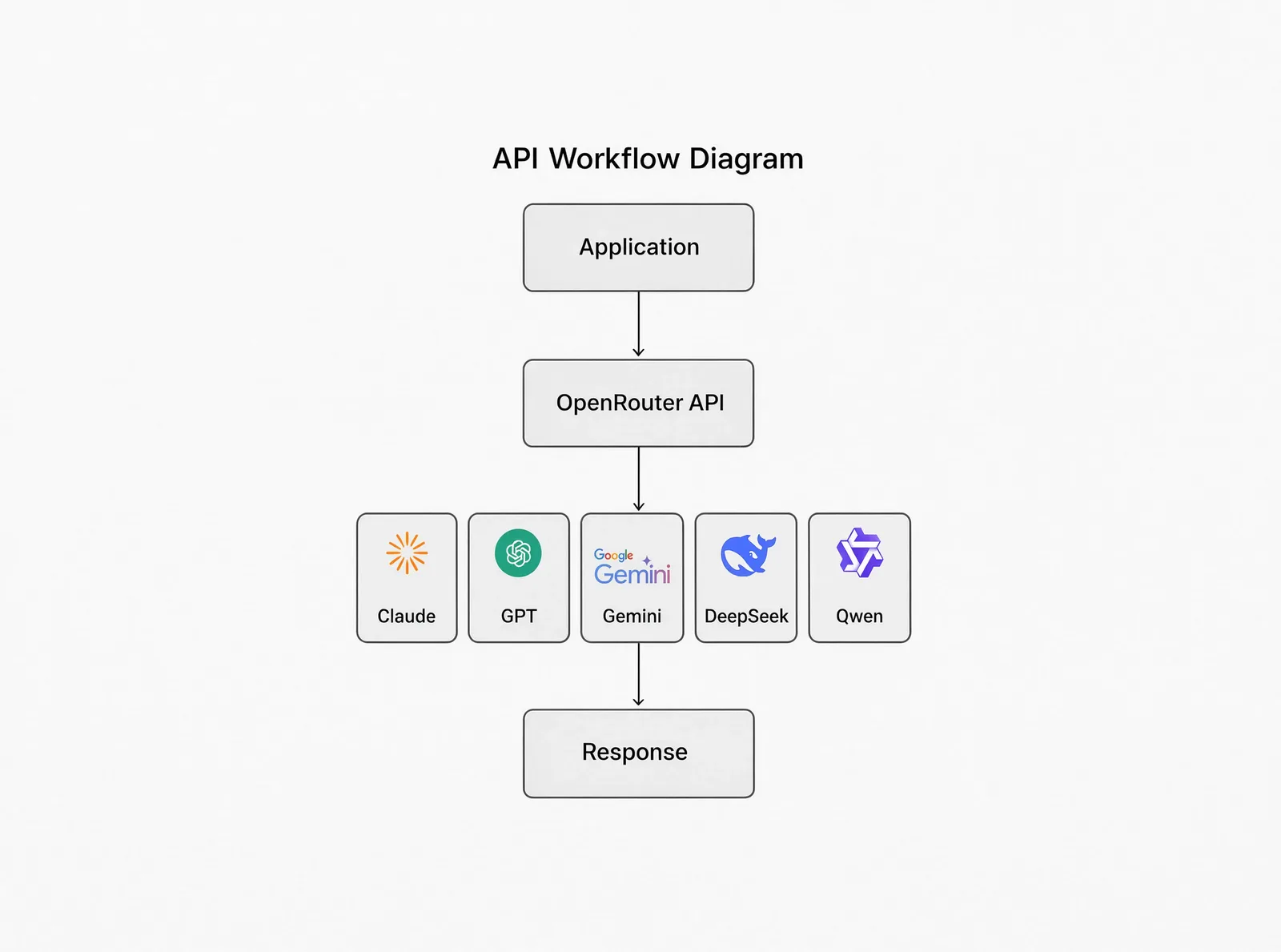
Instead of sending requests directly to one provider, your application sends requests to OpenRouter, which then forwards them to the selected AI model.
At a high level, the flow looks like this:
Your Application
        │
        ▼
   OpenRouter API
        │
 ┌──────┼────────┐
 ▼      ▼        ▼
OpenAI Anthropic Google
        │
        ▼
 Hundreds of AI Models
This architecture means your application can interact with many different model providers while maintaining a single integration.
OpenRouter also supports automatic provider fallbacks and routing logic so applications can continue operating even if a preferred provider becomes unavailable.
In this guide you’ll learn how OpenRouter works, when you should (and shouldn’t) use it, how pricing and BYOK work, best practices for production, cost optimisation, security considerations, common mistakes, and how OpenRouter compares with using provider APIs directly.
Why Developers Use OpenRouter
Imagine you’re building an AI coding assistant.
For code generation you may prefer Claude. For image understanding you might choose Gemini. For inexpensive batch processing you may use DeepSeek. For multilingual tasks you may select Qwen.
Without OpenRouter you would need to create accounts with each provider, generate multiple API keys, learn different APIs, maintain several SDKs, implement custom fallback logic, and monitor separate billing dashboards.
With OpenRouter you can often replace that complexity with a single API integration and select models as your needs change.
Who Should Use OpenRouter?
OpenRouter is especially useful for:
| Audience | Why OpenRouter helps |
|---|---|
| AI startups | Experiment with multiple models without rewriting your application every time a stronger model appears. |
| SaaS companies | Reduce vendor lock-in while choosing the best model for each feature. |
| Independent developers | Prototype quickly without maintaining multiple provider integrations. |
| AI researchers | Compare model behaviour using a consistent API surface. |
| AI agent developers | Create routing strategies that balance quality, latency and cost across providers. |
| Enterprise teams | Centralise access to multiple AI providers while applying governance, spending controls and routing policies. |
Who Should Not Use OpenRouter?
You may prefer direct provider APIs if:
- You only ever plan to use one provider.
- You require provider-specific enterprise capabilities.
- You have negotiated custom enterprise pricing with a single vendor.
- You must meet strict compliance or data residency requirements tied to a specific provider.
For many teams, a hybrid approach is also valid—for example, using direct APIs for a mission-critical workload while relying on OpenRouter for experimentation and multi-model features.
Why OpenRouter Has Become Popular
Several trends have accelerated adoption:
- Rapid growth in available AI models.
- Frequent model releases and deprecations.
- Increasing demand for AI agents and tool-using workflows.
- A desire to reduce vendor lock-in.
- Easier experimentation across providers.
OpenRouter’s unified API and routing capabilities address many of these challenges, allowing developers to change models with minimal application changes while keeping a consistent integration layer.
How OpenRouter Works
At first glance, OpenRouter appears to be “just another API.” It isn’t.
OpenRouter acts as an intelligent routing layer that sits between your application and dozens of AI providers. Instead of hard-coding your application to a single provider, you make requests to one API and let OpenRouter handle provider selection, routing and failover.
This architecture dramatically simplifies AI infrastructure, especially for applications that need reliability or access to multiple frontier models.
The Request Lifecycle
Every request follows a predictable lifecycle.
User
 │
 ▼
Your Application
 │
 ▼
OpenRouter API
 │
 ├───────────────┐
 │               │
 ▼               ▼
Provider Selection
 │
 ▼
Selected AI Provider
 │
 ▼
Language Model
 │
 ▼
Generated Response
 │
 ▼
OpenRouter
 │
 ▼
Your Application
 │
 ▼
User
Unlike a traditional API integration where you talk directly to one provider, OpenRouter introduces an intelligent routing layer that can optimise requests before they reach the selected model.
What Happens Behind the Scenes?
When your application sends a request, OpenRouter performs several checks before forwarding it. These may include authentication, model availability, provider availability, pricing, latency, throughput, provider health, request compatibility, tool support, and context window compatibility.
Only after these checks does OpenRouter choose the most appropriate provider.
Why This Matters for Production
Imagine your SaaS serves 500,000 users. Normally, if the provider you’re using experiences an outage, your AI feature simply stops working.
With OpenRouter, another provider hosting the same model can often be selected automatically, reducing downtime. For production systems, that can be a major operational advantage.
Provider Routing Explained
One feature that distinguishes OpenRouter is provider routing.
Many popular models are available from multiple infrastructure providers—for example, with varying prices, throughput and latency. Instead of forcing you to choose one permanently, OpenRouter can make that decision dynamically according to your routing preferences.
Default routing attempts to balance reliability and cost, considering provider uptime, health, price, and availability.
Performance routing prioritises providers with higher throughput or lower latency when speed matters more than price—useful for chat apps, live coding assistants, and customer support bots.
Cost optimisation favours lower prices when appropriate for batch jobs or large-scale inference.
Automatic Fallbacks
If the preferred provider is unavailable because of downtime, rate limits, moderation refusal, or provider errors, OpenRouter can automatically retry another provider or even another model if you’ve configured model fallbacks. Your users may never notice that the first request failed.
Application → Claude Sonnet → Provider Error → Automatic Retry → Alternative Provider → SuccessModel Fallbacks
Provider fallbacks and model fallbacks are different concepts:
| Type | Meaning |
|---|---|
| Provider fallback | Same model, different infrastructure provider |
| Model fallback | Different model (e.g. Claude Sonnet → GPT → DeepSeek) |
If the primary model cannot complete the request, OpenRouter can attempt the next model in the list, depending on how you’ve configured your request.
Smart Routing Summary
Depending on your configuration, you can optimise for lowest cost, lowest latency, highest throughput, maximum uptime, or BYOK usage (preferring your configured provider keys).
From a software architecture perspective, OpenRouter reduces complexity: one integration, adjustable routing and model selection as requirements change.
OpenRouter Models Explained
One of OpenRouter’s biggest advantages is that it doesn’t lock you into a single AI provider. It provides access to 400+ models from more than 70 providers through one API, allowing you to experiment, compare, and switch models without changing your application’s core integration.
Which Models Can You Access?
| AI Lab | Popular models |
|---|---|
| OpenAI | GPT family, image models |
| Anthropic | Claude family |
| Gemini family | |
| xAI | Grok family |
| Alibaba | Qwen family |
| DeepSeek | DeepSeek V-series |
| Meta | Llama family |
| Mistral AI | Mistral models |
| Cohere | Command models |
| MiniMax | MiniMax models |
Alongside frontier models, OpenRouter also hosts many open-weight, specialist, image, embedding, speech and reasoning models.
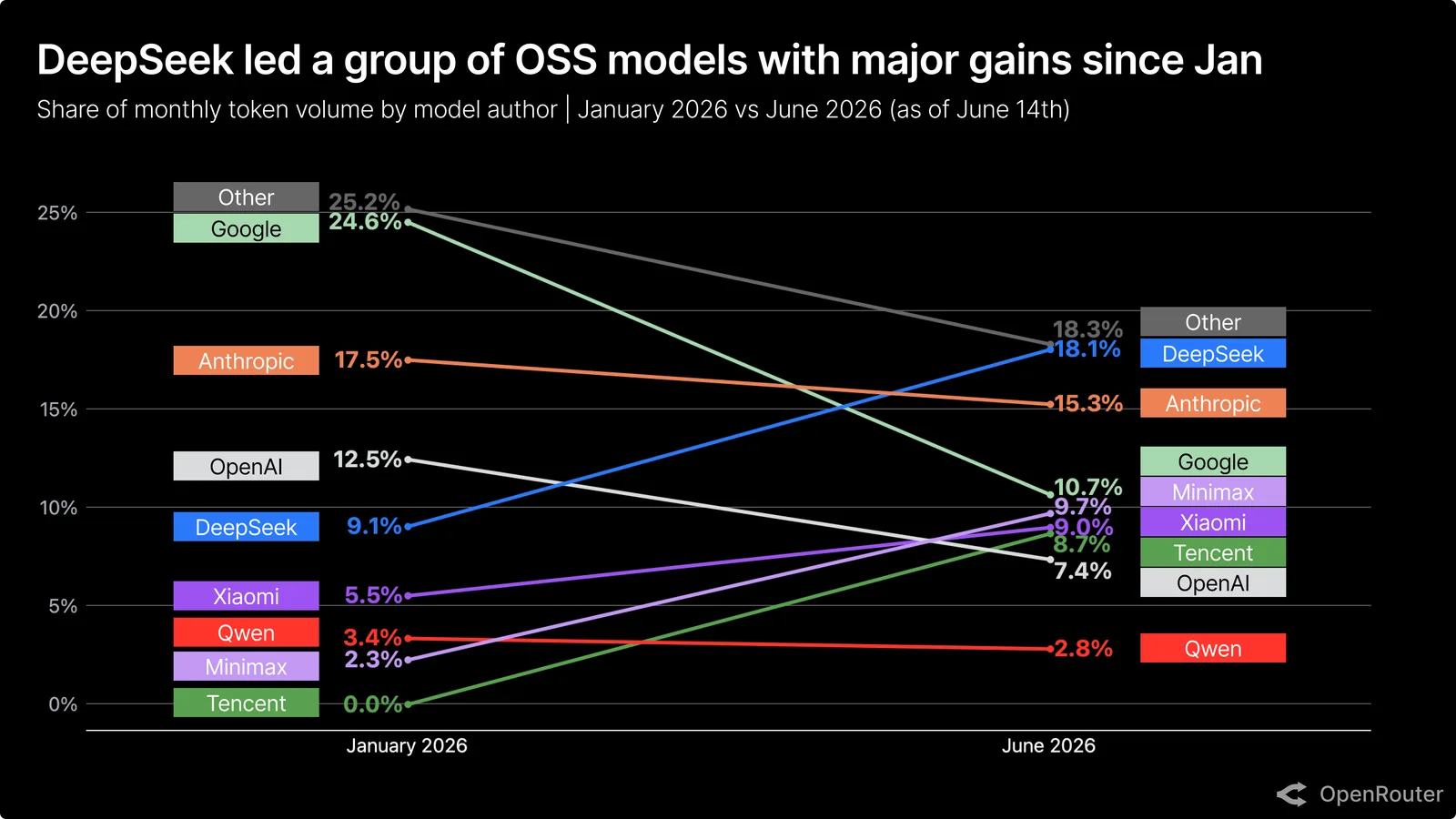
Why Having Hundreds of Models Matters
Many developers assume they will use one AI model forever. In practice, teams often discover that Claude writes cleaner code, GPT performs better for structured output, Gemini excels with multimodal tasks, DeepSeek offers lower costs, and Qwen performs well for multilingual workflows. OpenRouter lets you change models by updating the model identifier in your request instead of rewriting backend integrations.
Model Categories
Frontier models — highest-performing commercial models for complex reasoning, software engineering, research, agents, and enterprise workloads (Claude, GPT, Gemini, Grok).
Budget models — summarisation, classification, tagging, customer support, and batch processing at lower cost.
Open-weight models — Llama, selected Qwen and DeepSeek releases; popular for experimentation and cost-sensitive workloads.
Image models — generation and multimodal image tasks (availability depends on provider and model).
Embedding models — vectors for semantic search, RAG, recommendations, and knowledge bases.
Audio and speech — transcription and voice workflows through supported providers, useful for voice assistants and automated transcription pipelines without a separate vendor integration.
How Should You Choose a Model?
| Your goal | Recommended model type |
|---|---|
| Coding | Frontier coding models |
| Long reasoning | Advanced reasoning models |
| Customer support | Mid-range conversational models |
| Cheap automation | Budget models |
| RAG | Embedding + reasoning models |
| Vision | Multimodal models |
| Image generation | Dedicated image models |
The right model depends on balancing quality, latency and cost rather than chasing benchmark scores alone.
Context Windows
Every model has a context window—the amount of information it can process in one request. Larger windows help with repositories, lengthy documents, and large codebases. Check the OpenRouter model catalogue before selecting a production model.
Model Pricing
Common misconceptions:
- Inference pricing is generally passed through from the underlying provider.
- OpenRouter charges a platform fee when you purchase credits, rather than marking up inference itself in the typical credit flow.
- BYOK follows a separate fee structure after its free monthly allowance.
Overall costs are driven mainly by the model you choose, tokens processed, and usage patterns.
Should You Always Use the Most Powerful Model?
No. Using premium reasoning models for simple FAQs wastes budget. Reserve capable models for coding, research, planning, and agent orchestration; route simple tasks to budget conversational models.
Free Models vs Paid Models
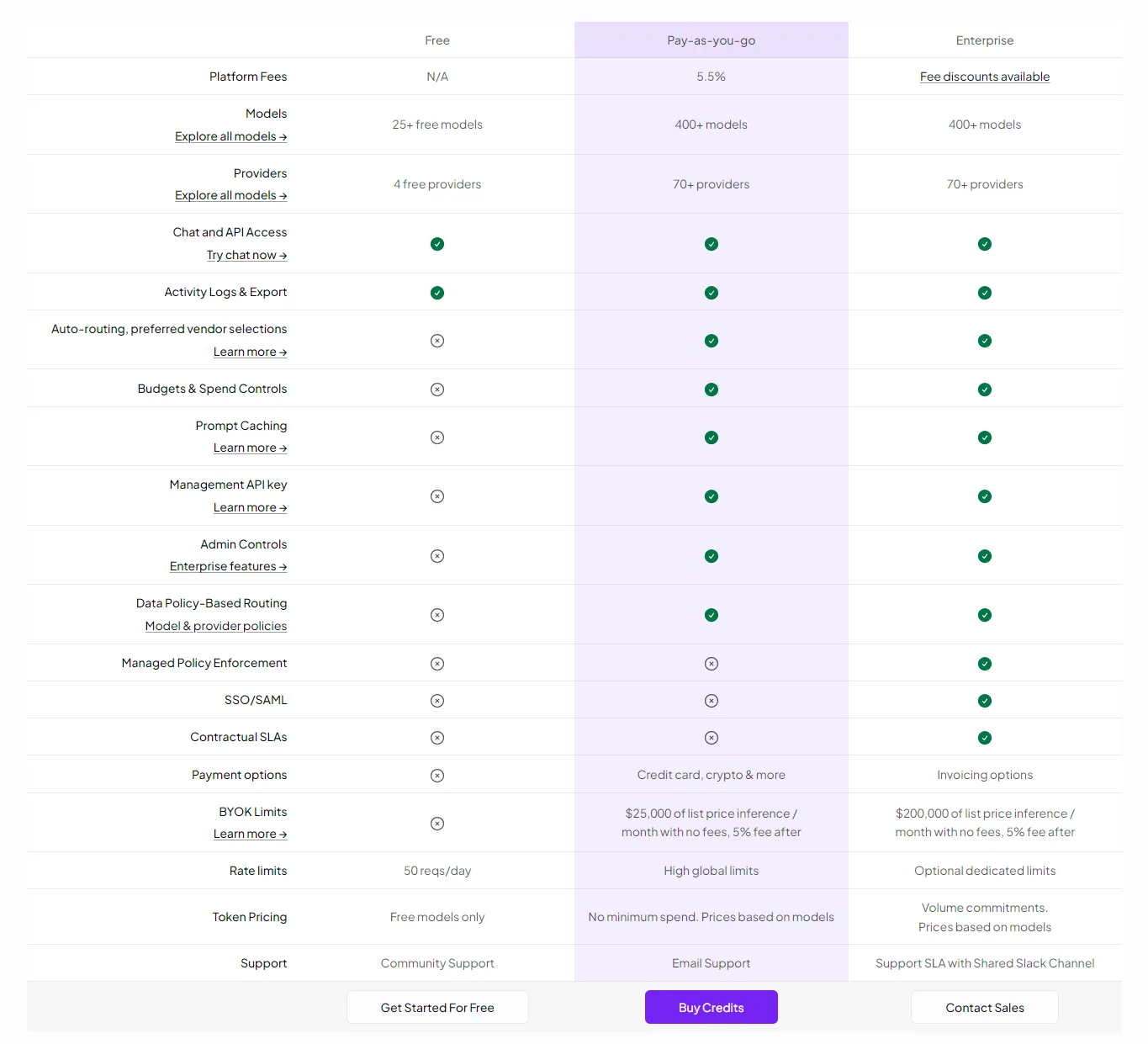
OpenRouter offers a limited free tier with access to selected free models and providers. Paid usage unlocks the broader catalogue, higher rate limits, and advanced platform capabilities.
| Feature | Free tier | Pay-as-you-go |
|---|---|---|
| Selected free models | Included | Included |
| Full 400+ catalogue | Limited | Included |
| High rate limits | Limited | Included |
| Advanced routing | Included | Included |
| Activity logs | Included | Included |
Best Practices for Model Selection
- Test models with your own prompts, not benchmarks alone.
- Compare latency and response quality.
- Measure token costs over time.
- Keep fallback models ready.
- Review model updates periodically.
Getting Started with the OpenRouter API
Now that you understand what OpenRouter is and why developers use it, it’s time to build your first application.
One of OpenRouter’s biggest advantages is that it uses an OpenAI-compatible API, making it easy to migrate existing projects with minimal code changes. In addition to the raw REST API, OpenRouter provides official client SDKs and tooling for higher-level AI workflows.
Step 1 — Create an OpenRouter Account
Visit openrouter.ai and create your account using Google, GitHub, or email.
Once your account is ready you’ll gain access to the dashboard, credits, models catalogue, API keys, usage analytics, and activity logs.

Step 2 — Generate an API Key
Open Settings → API Keys → Create Key. You’ll receive a key similar to:
sk-or-v1-xxxxxxxxxxxxxxxxxxxxxxxxTreat this key exactly like a password. Never commit it to Git, publish it on GitHub, expose it in frontend JavaScript, or include it in screenshots. Store it securely using environment variables:
OPENROUTER_API_KEY=sk-or-v1-xxxxxxxxStep 3 — Your First API Request
The simplest integration uses the Chat Completions endpoint:
POST https://openrouter.ai/api/v1/chat/completionsYour request includes the API key, selected model, and conversation messages. The response contains generated text, token usage, finish reason, and metadata. The API is intentionally compatible with the OpenAI Chat Completions format.
JavaScript Example
const response = await fetch(
  "https://openrouter.ai/api/v1/chat/completions",
  {
    method: "POST",
    headers: {
      Authorization: `Bearer ${process.env.OPENROUTER_API_KEY}`,
      "Content-Type": "application/json",
      "HTTP-Referer": "https://your-site.example",
      "X-Title": "Your App Name",
    },
    body: JSON.stringify({
      model: "openai/gpt-4o-mini",
      messages: [
        {
          role: "user",
          content: "Explain quantum computing simply.",
        },
      ],
    }),
  }
);

const data = await response.json();
console.log(data);
Python Example
import os
import requests

response = requests.post(
    "https://openrouter.ai/api/v1/chat/completions",
    headers={
        "Authorization": f"Bearer {os.getenv('OPENROUTER_API_KEY')}",
        "Content-Type": "application/json",
    },
    json={
        "model": "openai/gpt-4o-mini",
        "messages": [
            {"role": "user", "content": "Explain quantum computing."}
        ],
    },
)

print(response.json())
cURL Example
curl https://openrouter.ai/api/v1/chat/completions \
  -H "Authorization: Bearer $OPENROUTER_API_KEY" \
  -H "Content-Type: application/json" \
  -d '{
    "model": "anthropic/claude-sonnet-4",
    "messages": [{"role": "user", "content": "Hello"}]
  }'
Official OpenRouter SDKs
| Language | Install |
|---|---|
| TypeScript | npm install @openrouter/sdk |
| Python | pip install openrouter |
| Go | go get github.com/OpenRouterTeam/go-sdk |
SDKs are generated from OpenRouter’s OpenAPI specification, so new endpoints and models become available quickly after platform updates.
| Raw REST API | Official SDK |
|---|---|
| Manual requests | Typed client |
| Manual validation | Built-in validation |
| More boilerplate | Cleaner code |
| Manual response parsing | Typed responses |
Streaming Responses
Most modern AI applications stream responses rather than waiting for the full completion.
Instead of waiting for one large block of text, users see tokens arrive incrementally—similar to how ChatGPT and Cursor render answers. Enable streaming by setting stream: true and consuming the Server-Sent Events or chunked response in your client. Streaming improves perceived speed for chatbots, IDEs, coding assistants, customer support widgets, and writing tools, especially for long completions.
Switching Models
Changing models usually means changing one string:
model: "anthropic/claude-sonnet-4"
// becomes
model: "google/gemini-2.5-flash"
// or
model: "deepseek/deepseek-chat"
Your surrounding application logic often remains unchanged.
Environment Variables
Never hard-code API keys. Use .env locally and your platform’s secret store in production (process.env.OPENROUTER_API_KEY in Node.js, os.getenv("OPENROUTER_API_KEY") in Python).
Common Beginner Mistakes
- Hard-coding API keys
- Forgetting the
Authorizationheader - Selecting a model your account cannot access
- Ignoring streaming for chat applications
- Not checking token usage
- Sending unnecessarily large prompts
API Quick-Start Best Practices
- Store secrets in environment variables.
- Begin with a small prototype.
- Compare multiple models using your own prompts.
- Track token usage and costs.
- Use streaming where appropriate.
- Add fallback models for production.
- Monitor usage regularly.
BYOK (Bring Your Own Key) Explained
Bring Your Own Key (BYOK) lets you route inference through your own provider accounts while OpenRouter continues to provide routing, failover, and a unified API.
Some developers assume BYOK makes OpenRouter completely free for inference. That is not correct—you still pay the underlying provider, and OpenRouter may apply platform fees beyond the free BYOK allowance.
What Is BYOK?
Without BYOK:
Application → OpenRouter Credits → Selected Provider → AI ModelWith BYOK:
Application → OpenRouter → Your Provider API Key → Selected ModelInference is billed to your provider account (Anthropic, Google AI Studio, OpenAI, etc.) while OpenRouter provides routing and platform features.
Why Use BYOK?
Common reasons: existing provider credits, enterprise agreements, higher rate limits, negotiated pricing, internal billing, and centralised cost management—without giving up OpenRouter’s routing layer.
Real-World BYOK Example
Imagine your company already spends thousands each month with Anthropic under an enterprise agreement.
Without BYOK: every Claude request consumes OpenRouter credits, even though you already pay Anthropic directly.
With BYOK: requests flow through OpenRouter’s API and routing layer, but inference bills to your Anthropic API key. Finance continues to reconcile spend with Anthropic; engineering keeps one application integration.
Supported Providers
BYOK is supported for many providers, including OpenAI, Anthropic, Google AI Studio, Together AI, Groq, Fireworks AI, and others. Check OpenRouter’s BYOK documentation for the current list.
BYOK Fees
OpenRouter currently provides 1 million BYOK requests per month without the BYOK platform fee. After that allowance, a 5% BYOK platform fee applies to additional BYOK requests. This fee is separate from whatever your underlying provider charges for inference. Always confirm current limits on OpenRouter pricing.
OpenRouter Credits vs BYOK
| Feature | OpenRouter credits | BYOK |
|---|---|---|
| Provider bills you | No (via credits) | Yes |
| OpenRouter routing | Included | Included |
| Provider fallbacks | Included | Included (unless restricted) |
| Unified API | Included | Included |
| Use existing provider credits | N/A | Yes |
Provider Fallbacks with BYOK
If your Anthropic BYOK request fails (quota, rate limits, outage), OpenRouter may route through another compatible provider unless you restrict routing. That fallback can consume OpenRouter credits if allowed.
To ensure requests only use your provider key, configure routing to limit providers and disable unwanted fallbacks. If Anthropic becomes unavailable, the request fails instead of switching to credit-based routing.
When BYOK Makes Sense
Enterprise teams with negotiated contracts, startups with cloud credits, agencies separating customer billing, multi-provider apps, and developers who want one API with provider-level billing.
When You Probably Don’t Need BYOK
Learning projects, hobby apps, very small usage, or when you prefer a single OpenRouter credit balance.
OpenRouter Credits
OpenRouter uses a prepaid credit system for standard accounts. There is no recurring subscription for ordinary usage—you buy credits and consume them as your application makes requests. Auto-recharge is optional.
Monitoring Usage
The dashboard includes usage history, activity logs, credit balance, token consumption, request history, and provider information. Review these regularly to catch expensive prompts and unexpected routing.
Cost Optimisation Tips
- Use premium models only for difficult tasks.
- Route simple requests to lower-cost models.
- Keep prompts concise; reuse context where appropriate.
- Monitor token usage and test providers before deploying.
- Configure fallback policies intentionally.
Common BYOK Mistakes
- Assuming BYOK eliminates all OpenRouter charges.
- Forgetting that provider fallbacks can consume OpenRouter credits.
- Exposing provider API keys in client-side code.
- Ignoring usage analytics.
- Not testing fallback behaviour before production.
Advanced OpenRouter Features
Modern AI applications require low latency, cost optimisation, reliable structured outputs, tool calling, agent workflows, caching, observability, and production-ready reliability. OpenRouter includes features aimed at these use cases.
Prompt Caching
Repeatedly sending the same system instructions, documentation, or repository context can dominate token spend. Prompt caching allows providers (where supported) to reuse previously processed prompt content. OpenRouter also uses sticky provider routing to maximise cache hits during a session.
Sticky routing keeps requests for the same session on the same provider when possible. You can also specify a session_id to improve consistency across long-running workflows.
Response Caching
Response caching returns a previously generated response for identical requests. Cache hits can reduce latency and billed tokens for duplicate queries—distinct from prompt caching, which reuses prompt processing.
Original Request → Model generates response → Stored
Identical Request → Cached response → No inference cost (on cache hit)
OpenRouter’s response caching feature is designed for idempotent or repeated queries—such as FAQ lookups, static prompt templates, or deduplicated agent steps—where serving the same answer twice is acceptable.
Structured Outputs
Business workflows often need predictable JSON for CRM automation, dashboards, analytics, and form processing. Structured outputs reduce parsing errors and simplify downstream automation (support varies by model—check the model page).
Tool Calling
OpenRouter standardises tool (function) calling across supported models, making it easier to integrate weather APIs, search, databases, GitHub, Stripe, Slack, and internal services without provider-specific differences.
The model does not execute your code—it returns structured arguments. Your application validates, runs business logic, and optionally sends results back to the model.
AI Agents
Agents combine reasoning, memory, tools, planning, and execution. Instead of answering a single question, they perform multi-step tasks:
Research company → Search website → Read documentation → Summarise → Generate report → Notify userOpenRouter’s unified model access and routing support agentic systems where different models handle different stages—for example, a fast model for tool selection and a stronger model for final synthesis—or where fallbacks keep an agent running when one provider degrades.
Observability and Rate Limits
Use dashboard metrics for tokens, costs, models, and providers. Production apps should retry intelligently, handle errors gracefully, use fallbacks, and avoid infinite retry loops when hitting RPM/TPM or provider quotas.
Production Best Practices
- Never depend on one model — configure model and provider fallbacks.
- Monitor costs weekly — credits, tokens, provider mix, cache effectiveness.
- Use prompt caching where supported for repeated long context.
- Keep prompts modular — system, context, and user layers for maintainability and cache efficiency.
- Benchmark real workloads — your prompts, latency, and costs—not leaderboard scores alone.
Common Production Mistakes
- Choosing the most expensive model for every task
- Ignoring caching for repeated long system prompts
- Forgetting fallback models or provider restrictions with BYOK
- Hard-coding provider-specific response formats instead of testing across models
- Ignoring token usage until the invoice arrives
- Shipping without monitoring dashboards or alerts
Security Best Practices
- Store API keys in environment variables; rotate periodically.
- Never expose secrets in frontend code; use HTTPS for all requests.
- Monitor unusual usage and review billing dashboards.
- Use organisation guardrails where available: provider allowlists, API key budgets, zero data retention options for supported providers, and sensitive-information filtering.
Privacy
Organisations often ask whether OpenRouter stores prompts. Per OpenRouter’s documentation:
- Prompt and completion contents are not logged by default.
- Basic request metadata (timestamps, model, token counts) is logged for billing and analytics.
- Optional prompt/completion logging may be available in exchange for usage discounts.
- Requests are forwarded to the selected provider, whose privacy policy still applies.
Review OpenRouter privacy documentation and each provider’s policy before handling regulated data.
Troubleshooting
| Symptom | Things to check |
|---|---|
| 401 Unauthorized | API key env var, header format Bearer sk-or-... |
| 402 / insufficient credits | Credit balance or BYOK key validity |
| Model not found | Model ID spelling; account access to paid models |
| Slow responses | Try performance routing or a faster model tier |
| Unexpected charges | Fallback routing, large prompts, premium model on simple tasks |
| Rate limited | Backoff, fallbacks, request batching, account tier |
OpenRouter vs Direct Provider APIs
| Feature | OpenRouter | Direct provider API |
|---|---|---|
| One API for many models | Yes | No |
| Automatic provider fallbacks | Yes | No |
| Switch models easily | Yes | Limited |
| Unified billing | Yes | No |
| Single SDK surface | Yes | Per provider |
| Provider-specific beta features | Sometimes delayed | Immediate |
| Enterprise contracts | Limited | Often best |
| Lowest possible latency | Good | Usually best |
When OpenRouter Is the Better Choice
Building AI SaaS, agents, developer tools, multi-tenant products, or any workflow where you compare models and switch often—without rewriting integrations each release cycle.
When Direct APIs Make More Sense
Single-vendor standardisation, enterprise-only features, immediate beta access, strict compliance tied to one provider, or deeply negotiated enterprise pricing.
OpenRouter vs OpenAI API
| Category | OpenRouter | OpenAI |
|---|---|---|
| Multiple AI labs | Yes | No |
| GPT models | Yes | Yes |
| Claude / Gemini / etc. | Yes | No |
| Unified billing & fallback | Yes | No |
If you will only ever use OpenAI models, the OpenAI API remains straightforward. If you may test other families, OpenRouter reduces future migration effort.
OpenRouter vs Anthropic API
| Category | OpenRouter | Anthropic |
|---|---|---|
| Claude models | Yes | Yes |
| Other AI labs | Yes | No |
| Routing & fallbacks | Yes | No |
| Unified interface | Yes | No |
| Native Anthropic features | Sometimes later | Immediate |
Claude-native features may arrive on Anthropic’s API first. Teams evaluating multiple providers often prefer OpenRouter’s unified surface; Claude-only shops may prefer Anthropic direct.
OpenRouter vs Google AI Studio
Google AI Studio excels for Gemini-first workflows. OpenRouter lets you compare Gemini with Claude, GPT, Qwen, DeepSeek, and others without architectural changes.
Real-World Use Cases
| Scenario | Recommended approach |
|---|---|
| AI coding assistant | OpenRouter, coding models, streaming, prompt caching, fallbacks |
| Customer support | Mid-range conversational model, tool calling, structured outputs, usage monitoring |
| Internal knowledge base | Embedding model + RAG + long-context reasoning model |
| Startup MVP | Single API, multiple models for experimentation, cost monitoring |
Frequently Asked Questions
What is OpenRouter?
OpenRouter is a unified AI API platform that provides access to hundreds of language models from multiple AI providers through a single OpenAI-compatible API.
Does OpenRouter support Claude?
Yes. OpenRouter provides access to supported Anthropic Claude models alongside models from many other AI labs.
Can I use my own API keys?
Yes. BYOK allows provider-issued API keys while benefiting from OpenRouter routing and a unified interface.
Is OpenRouter free?
OpenRouter provides access to selected free models with rate limits. Most production workloads use prepaid credits or BYOK.
Can I switch models later?
Yes. Change the model field in your request—usually without redesigning your integration.
Does OpenRouter increase model prices?
OpenRouter states that it passes through underlying provider inference pricing without adding an inference markup in the typical credit flow. Platform fees apply when purchasing credits; BYOK has its own fee structure after the free monthly allowance.
Should beginners use OpenRouter?
Yes, if you want to explore multiple models from one integration rather than creating separate accounts for each provider.
Is OpenRouter suitable for production?
For many teams, yes—routing, fallbacks, monitoring, and unified billing support production workloads. Evaluate compliance, latency, and provider-specific requirements for your domain.
TrendForge Verdict
OpenRouter has become one of the most practical layers in the modern AI stack. It offers a flexible way to compare models, switch providers, optimise costs, improve reliability, and build multi-model applications without maintaining a separate integration per vendor.
For hobby projects, startups, and many production SaaS products, that flexibility can significantly reduce engineering effort. Teams with strict enterprise requirements or deep single-provider integrations may still prefer direct APIs—or a hybrid of both.
The AI ecosystem will keep changing; OpenRouter’s value proposition is making those changes cheaper to absorb in your codebase.
Changelog
July 2026
- Initial publication of the OpenRouter complete guide (2026)
- Added API, BYOK, routing, and production best-practice sections
- Added architecture, dashboard, model comparison and pricing images with full SEO attributes
Last reviewed: July 2026
Related Articles
- Best AI Coding Assistants (2026)
- Cursor AI Complete Guide (2026)
- ChatGPT vs Claude: Which AI is Better? (2026)
- Cursor MCP Complete Guide (2026)
References
Always confirm model IDs, pricing, BYOK limits, and privacy options against official documentation before production deployment—OpenRouter and underlying providers update frequently.